My Spectrum
- 4.7
- Rating
- 10.00M
- Installs
- Free
- Price

 Analysis by App-foxy
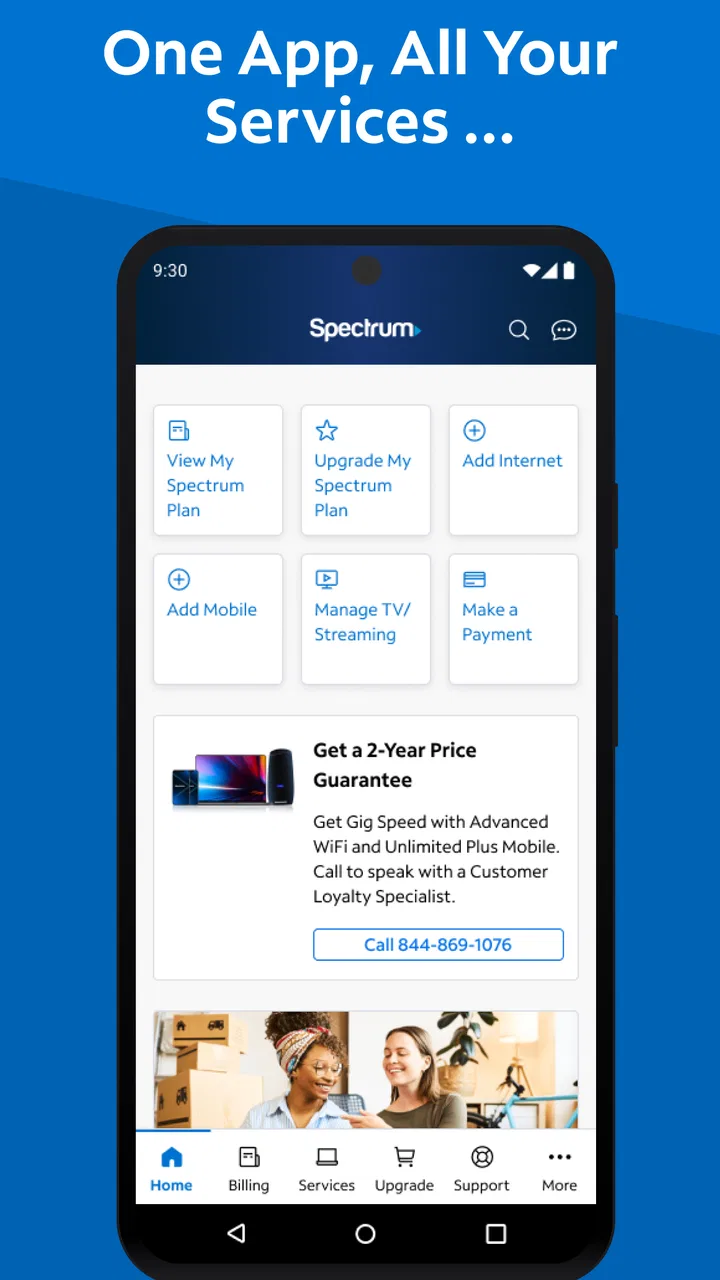
I use the My Spectrum app as a practical control panel for Spectrum services rather than as an app I open for entertainment. It is a free tools app from Charter/Spectrum, and its main value is putting common account and service tasks in one place. That sounds simple, but it matters when I am trying to understand a bill, check whether an internet problem is local, or manage service without waiting on a phone call.
My first impression was that the app is aimed at reducing friction for existing Spectrum customers. It is not a general internet utility, and it is not especially useful if you do not have Spectrum services to manage. For the right household, though, it can replace several small chores that would otherwise require a browser, a support call, or a visit to a store.
How the app feels to use day to day
I find the day-to-day experience works best when I treat the app as a place to answer one clear account question, rather than as a dashboard to explore. That approach also helps me notice when a task would be easier on a larger screen or with another support option. The next section looks at how its navigation supports—or sometimes interrupts—that focused way of using it.
You May Also Like

 Blood Strike: 2.5 Anniversary
Blood Strike’s Loadouts Turn Every Drop Into a Tactical Gamble
A close look at Blood Strike’s custom loadouts: how fast access to signature weapons reshapes its battle royale rhythm, rewards preparation, and narrows the gap between fights.

 Pandora - Music & Podcasts
Pandora’s Music Is Easy to Start, but Harder to Recover
Pandora’s strength is its low-effort path from a seed to a station. Its weak spot is how much confidence it asks you to place in connection, setup, and quiet recovery.

 8 Ball Pool
 Is Built on Rivalries, Rematches, and Routine
A close look at the rivalries, rematches, shared routines, and unanswered safety questions that turn a quick pool match into a persistent mobile community.

 Samsung Music
’s Quiet Strength Is Playing What You Already Own
Its reach comes less from spectacle than from dependable access to a personal library. That simplicity is both the app’s strongest retention engine and its ceiling.

 AccuWeather: Weather Radar
AccuWeather Review: A Quick, Clear Forecast for Everyday Decisions
For everyday plans, the best forecast is the one you can understand quickly. AccuWeather makes rain timing, radar, and local conditions easy to act on, with a few trade-offs.

 Hill Climb Racing
Why Hill Climb Racing Still Turns Crashes Into One More Run
A tiny car, a bumpy hill and one more upgrade: Hill Climb Racing keeps resurfacing because its simple chaos makes every near-miss feel personal.
More From Our News Desk



Readability and navigation for ordinary account tasks
The strongest part of the experience is the straightforward purpose of each area. I can approach the app with a specific question—“What is happening with my service?” or “What do I need to pay?”—instead of having to understand a complicated technical dashboard first. The design is most helpful when I use it as a sequence of small tasks rather than browsing every screen at once.
For someone who is comfortable with smartphones, the basic flow is familiar: open the account, identify the relevant service, and follow the available action. That makes it easier for a family member to take over a task without learning a separate support system. The app is also less intimidating than calling support for a simple account question, especially when I need to review information at my own pace.
Readability is not only about large text. It is also about whether the screen gives enough context before asking me to continue. In my experience, the app works best when I slow down and read the service details instead of tapping through quickly. That is useful for people who prefer careful confirmation, including older users who may want to verify what they are changing before proceeding.
There is a practical accessibility advantage in having account information available visually. A person who has difficulty following a fast phone conversation can review the details on screen and return to them later. Someone who communicates more comfortably through written information may also prefer this route to calling. That does not make every task effortless, but it changes the pace from a live conversation to something I can control.
The app’s age rating is Everyone, which fits its household-account purpose. It is also a mature product, released on December 15, 2014, so it feels like an established companion for Spectrum customers rather than a newly introduced experiment. The current version is 26.4.0, and it requires Android 10 or later. That operating-system requirement is important for anyone using an older phone: the app may be a good fit in principle, but the device itself still determines whether installation is possible.
Where navigation helps, and where it can slow me down
The app is clearest when I already know what I want to do. If I am checking service information, reviewing account details, or looking for a way to get help, the focused structure makes sense. It is less satisfying when I am unsure which category contains the answer. In those moments, I may have to move between account, service, and support areas before finding the right path.
That distinction matters for users with cognitive or attention-related needs. A short task can remain manageable if the next action is obvious, but uncertainty creates extra mental work. I recommend deciding on the goal before opening the app: identify the bill, check connectivity, or find support. This small habit prevents aimless navigation and makes the experience more predictable.
I also prefer using the app when I have enough time to read carefully. It is not the kind of tool I would hand to someone and say, “Just tap around until you find it.” The account context is important, and a mistaken choice in a service-management screen can be more serious than a mistaken tap in a casual app. The interface is useful, but it rewards deliberate use.
Motor comfort and the value of slower interaction
For people with limited dexterity, a mobile account app can be more comfortable than a phone call that requires navigating an automated menu or explaining a problem repeatedly. I can pause between actions, reposition the phone, and confirm what is on screen. That is a real benefit for anyone who finds rapid tapping or spoken instructions tiring.
At the same time, an app cannot remove all motor demands. I still need to handle the phone, select controls accurately, and move through screens. Users who have difficulty with small touch targets or sustained gestures may find a desktop browser, a larger tablet, or assistance from another person easier. I would not describe the app as a complete substitute for every other support channel.
A useful workaround is to avoid trying to complete a complicated task while distracted. I prepare the account information I may need, sit somewhere stable, and use the phone with both hands if necessary. That sounds ordinary, but it reduces accidental taps and makes reading easier. For users with tremors or hand fatigue, a larger device can make the same app much more comfortable.
People who rely on keyboard navigation should think about platform choice. The app is designed for touch, while a browser on a computer may offer a more familiar keyboard-and-mouse workflow. I would choose the mobile app for quick checks and the larger-screen alternative when the task involves extended reading, comparison, or repeated form entry.
Sensory considerations when the situation is stressful
Connectivity problems are often stressful before I even open the app. A household may be trying to work, attend a remote class, make a call, or watch something important. In that situation, a clear account view is helpful because it gives me a place to start instead of leaving me to guess whether the problem is with the home network, the device, or the service.
However, the app cannot guarantee a calm experience when the connection itself is unreliable. If my internet is down and my phone is using the same home connection, loading screens may be slow or unavailable. Mobile data can help when it is available, but I would not treat the app as an offline troubleshooting tool. This is one of the most important situational limitations.
Visual users may appreciate having service information presented in a form they can reread. People who are sensitive to visual clutter should keep their goal narrow and avoid opening unrelated account areas. Those who need spoken output or enlarged content should use the accessibility settings already available on their device, while remembering that system support does not automatically make every screen equally comfortable.
I also find written account management preferable to a phone call when I need to avoid sensory overload from hold music, fast speech, or a long explanation. The benefit is not that the app eliminates stress; it gives me more control over the pace. That difference can be meaningful for users who process information slowly or who need to revisit instructions.
A realistic household scenario
Imagine a family whose internet becomes unreliable just before an evening appointment. One person is working from home, another is trying to join a video call, and nobody wants to spend the next hour guessing what is wrong. I would open My Spectrum on a phone, check the account and service information, and use the available support path to determine whether the issue appears connected to the service or needs a different response.
The accessibility value here is situational. The app puts the first check in the hands of the person who is already present, rather than requiring the household to find a quiet place for a support call. A family member with hearing difficulties may prefer reading the information. Someone with limited energy may be able to complete a short check but not manage a long conversation. Another person can assist by reading the screen or taking over the phone without starting the process from the beginning.
There is also a trade-off: if the service problem prevents the app from loading, the household needs another route. I would keep a browser or support contact available rather than relying on one channel. The app is most useful as one part of a backup plan, not as the only way to respond to an outage.
Situational access beyond the home
The mobile format is convenient when I am away from my usual computer. I can check an account while traveling, help a relative from another room, or handle a small task while waiting somewhere. That flexibility is especially useful for people who cannot easily sit at a desk or who share a household computer.
It can also support informal caregiving. If a family member manages household services for someone who has difficulty with small print, phone conversations, or remembering account steps, the app provides a shared visual reference. I would still be careful about privacy and account ownership, but the practical workflow is simpler than trying to relay every detail verbally.
For users with limited data, battery, or an unreliable mobile connection, the app is less dependable as a travel tool. I would avoid opening it for a non-urgent task in a place with poor reception and would complete important account work before leaving home when possible. The app is convenient, but convenience depends on the phone and network being ready at the same time.
The minimum Android requirement also affects situational access. Someone using an older phone may not be able to install the current release, even if the device still handles calls and basic web browsing well. In that case, the browser version or help from another household member may be the more inclusive option. This is not a flaw unique to Spectrum, but it is a real barrier for people who keep phones for many years.
What the app does better than usual alternatives
Compared with calling customer support, the app gives me more control over timing and repetition. I can reread account information, stop midway, and return when I am ready. That is valuable for users who have hearing, speech, memory, or processing needs. It also avoids the uncertainty of explaining a problem before knowing which department can help.
Compared with using a mobile browser, the dedicated app can feel more direct for recurring Spectrum tasks. I do not need to begin with a general search or remember the exact web address. The trade-off is that the app takes up space on the phone and depends on compatibility with the operating system. A browser may be better for someone who rarely manages the account or who prefers a larger display.
Compared with visiting a store, the app is clearly more convenient for routine account work. It is available at home and does not require travel, waiting, or navigating a physical environment. A store or live support person may still be preferable when the problem is complicated, when identity or account details require assistance, or when the user needs human reassurance.
Compared with a generic connectivity tool, My Spectrum has a narrower but more relevant role for Spectrum customers. A generic network utility may help inspect a device or wireless signal, but it will not serve as the same account-management point. I would use a generic tool for device-level investigation and this app for Spectrum service and account tasks. They solve different parts of the problem.
Practical strengths for different abilities
One of the app’s less obvious strengths is that it lets households divide tasks according to ability. A person who cannot comfortably make a phone call may review the written information. Someone with better hand control may complete the taps. A caregiver can help interpret the screen. This shared workflow is more flexible than assuming one person must do everything alone.
Another useful point is pacing. Users with fatigue can handle a short account check, stop, and continue later instead of remaining on a call. Users who need extra time to understand a charge or service detail can reread the screen. That does not guarantee that every page will be equally easy to interpret, but the overall model supports a slower decision process.
A third insight is that the app works best when paired with preparation. I keep the phone charged, know which Spectrum service I am checking, and avoid troubleshooting during the most chaotic moment of the day. For users with memory difficulties, writing down the exact question before opening the app can prevent repeated navigation. For caregivers, a short written checklist can make assistance more consistent.
The app’s broad adoption suggests that it has become a familiar tool for many Spectrum households: it has over ten million installs, around a 4.7 average, and roughly 1.2 million ratings. Those figures do not tell me that every user will find every screen accessible, but they do show that this is not an obscure companion app. Its free price also removes one common barrier to trying it, although access to the managed services still depends on being a Spectrum customer.
Remaining barriers and reasons to choose something else
The biggest limitation is account dependence. If I do not use Spectrum services, there is no meaningful reason to install this app. Even within a household, a person without the necessary account access may be able to view information only with help from the account holder. That makes it less suitable as an independent tool for every family member.
The second limitation is that a mobile screen can become cramped when a task involves several details. I prefer a computer or tablet for extended reading, careful comparison, or anything that requires repeated typing. Users with low vision, hand pain, or difficulty maintaining a steady grip may also find the larger-screen route more comfortable.
The third is dependence on connectivity and device compatibility. A service-management app is least convenient when service is failing, and the Android 10 minimum can exclude older phones. I would not replace every support option with the app. Keeping browser access, a support route, or a trusted helper available is sensible, especially for households that depend heavily on internet service.
I also would not recommend it to someone who strongly prefers face-to-face help for billing or service decisions. The app can organize information, but it cannot provide the reassurance, interpretation, or patience of a person who understands the user’s specific situation. For complex issues, human support may be worth the extra effort.
Finally, accessibility is personal. A screen that feels clean to me may still be difficult for someone with a particular visual, motor, cognitive, or sensory need. I would test the app with the device settings and assistive tools that the intended user already relies on, then compare it with the browser or a support call. The best choice is the one that lets that person complete the task accurately and with the least stress.
My inclusive verdict for Spectrum households
I see My Spectrum as a useful, focused companion for people who already manage Charter/Spectrum services and want a written, self-paced way to handle everyday account needs. Its free availability, familiar mobile format, and established presence make it easy to try. The Everyone age rating also reflects its practical household role, while the current Android requirement should be checked before planning around it.
For accessibility, its main contribution is control: control over timing, repetition, and the choice between handling a task independently or sharing the screen with a helper. That can make a meaningful difference for people who find phone support tiring, confusing, or difficult to hear. The app is especially good for quick checks and routine management when the phone and connection are working normally.
I would recommend it to Spectrum customers who want a convenient first step and who are comfortable with touch navigation. I would pair it with a browser, a larger device, or human support for complex tasks, older phones, unreliable connectivity, or users who need more specialized assistance. The best reason to use it is not that it replaces every support channel, but that it gives more people a manageable starting point.
Overall, I consider My Spectrum a worthwhile tools app for its intended audience. It is not universally effortless, and it cannot solve the access problems created by a small screen, an old device, or a failed connection. Still, when used with those limits in mind, My Spectrum makes routine service management more flexible and gives households more than one way to stay in control.
FAQs for My Spectrum
01What features does the My Spectrum app offer?
The My Spectrum app provides a variety of features to manage your Spectrum services efficiently. You can pay your bills, troubleshoot issues with your equipment, view and update your account details, and even control your Wi-Fi settings. The app also offers 24/7 customer support access, making it a comprehensive tool for Spectrum users.
02Is the My Spectrum app compatible with all devices?
The My Spectrum app is available for both Android and iOS devices. It supports most smartphones and tablets running on the latest operating systems. However, it's always best to check the app store for specific compatibility details related to your device’s model and OS version.
03How secure is the My Spectrum app?
Security is a priority for the My Spectrum app. It uses encryption to protect your personal and payment information. The app requires a secure login with your account credentials, ensuring that your data is protected. Regular updates are also released to address any security vulnerabilities.
04Does the My Spectrum app support multiple accounts?
Yes, the My Spectrum app allows users to manage multiple Spectrum accounts. This feature is particularly useful for users with different service addresses or those managing accounts for family members. You can easily switch between accounts within the app to view and manage each one separately.
05What should I do if the My Spectrum app is not working properly?
If you encounter issues with the My Spectrum app, try restarting your device and checking your internet connection. Ensure the app is updated to the latest version. If problems persist, the app offers troubleshooting tips and direct access to customer support for further assistance.
Pros
- User-friendly interface for easy navigation.
- Real-time updates on service issues.
- Customizable alerts for outages.
- Efficient bill pay and account management.
- 24/7 customer support via chat.
Cons
- Limited features for non-Spectrum users.
- Occasional app crashes reported.
- Limited functionality offline.
- Initial setup can be confusing.
- Requires frequent updates.

My Spectrum
Gallery